
Instagram Photo Dump: How to Make One and Caption It
An Instagram photo dump is a carousel that looks like a camera roll. How to pick, order and caption one for an app or brand account, step by step.

You shipped something this week, and your camera roll proves it: a whiteboard covered in arrows, a laptop at 1 a.m., the coffee that got you through the bug, a screenshot of the first kind message from a user. None of it looks like a post. Together, it is an Instagram photo dump.
An Instagram photo dump is a carousel of loosely connected photos and short clips, up to 20 of them, posted together with one short caption. To make one, pick 6 to 10 frames that share a thread, open on your strongest one, make the second frame work on its own, keep one orientation, and write a caption whose first line carries the point. The rest of this guide walks through each step and the captions that do a job for an app or brand account.
What an Instagram photo dump is, and why it still works
The Guardian described the format as a set of "ostensibly unedited, low-stakes, impressionistic photos posted in a seemingly random order and finished with a dispassionate caption." The key word is ostensibly. A good dump looks casual and is chosen with care.
Later traces the trend to lockdown, when there were no events to photograph and the small moments of a day became the content. For a brand, the appeal is the same: a dump shows the people and the mess behind a product without the polish of a campaign.
The format also rides on the strongest post type Instagram has for engagement. Metricool's 2026 study of more than 24 million Instagram posts found that carousels earn about nine times more saves than single-image posts, while single images lost reach year over year. In a Buffer analysis of more than 45 million posts, Instagram carousels had a median engagement rate of 6.9%, against 4.4% for single images and 3.3% for Reels.
The honest limit
Engagement and reach are different numbers. Buffer's same analysis notes that Reels reach more people, while carousels get more interaction from the people who see them. SociaVault's October 2026 sample of 4,052 posts from 170 accounts points the same way: carousels got 1.09 times an account's usual likes and comments, Reels 1.00, single photos 0.80, and accounts with 10,000 to 100,000 followers gained most at 1.30. A photo dump deepens a relationship with followers. It is a weaker tool for reaching strangers, so it sits beside your Reels, not in place of them.
What you need before you start
You need less than a shoot and more than a random scroll through your phone. Gather these before you open Instagram:
- Six to ten photos or clips from one week, one event or one project, plus a few spares.
- One shape for all of them, square or portrait, since Instagram applies a single orientation to every slide.
- Permission from anyone recognisable in the frame, and nothing on a screen you would not want a stranger to read.
- One sentence that says what the set is about. That sentence becomes the start of your caption.
How to make a photo dump on Instagram, step by step
Seven steps, from choosing the thread to writing the caption. The first four happen in your camera roll, the last three inside Instagram.
Step 1: Pick a thread, not a theme
"Summer" is a theme. "The week we rebuilt onboarding" is a thread. A thread gives every frame a reason to be there and gives the viewer a small story to follow across the swipes.
For an app account, the best threads are short and specific: a launch day, a week of support tickets, a conference trip, the move to a new office, the first version of a feature next to the one that shipped. If you cannot say the thread in one sentence, the dump will read as random in the bad sense.
Step 2: Choose 6 to 10 frames from the set
Instagram allows up to 20 photos and videos in one carousel, but more is rarely better. Ten frames that all earn their place beat twenty where the viewer starts skipping by slide eight.
Mix the frame types so each swipe brings something new. A wide shot of the room, a close-up of a detail, a screenshot, a short clip, a person seen from behind, an object that only makes sense once you know the story. Drop any frame that repeats what the one before it already said.
Step 3: Order it so slide one stops the scroll and slide two stands alone
The first frame decides whether anyone swipes. Open on the most striking image you have, the one that raises a question: an odd object, a messy desk, a clip with motion in its first second.
Slide two matters almost as much. Instagram head Adam Mosseri explained in an October 2024 video, as Mashable reported, that if someone sees a carousel but does not swipe, Instagram will "often give that carousel a second chance and automatically move to that second piece of media for the viewer." Your second frame is a second cover, so it has to work without the first.
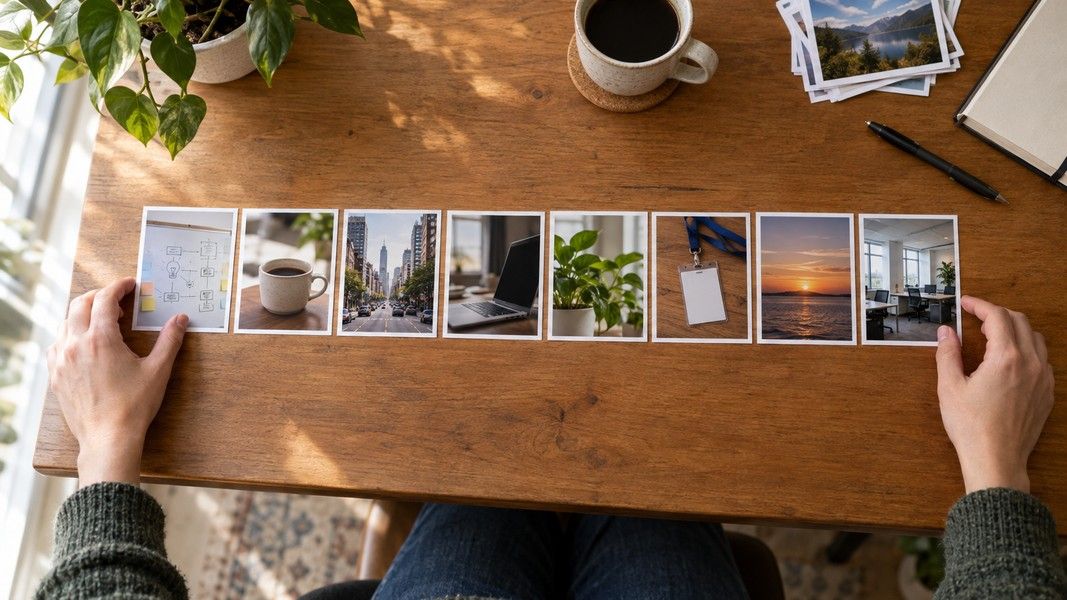
After those two, alternate the pace: a quiet frame after a busy one, a clip after three stills. End on something that closes the thread, such as the finished thing, the team leaving the building or the empty whiteboard.
Step 4: Crop everything to one shape
Instagram's Help Center is explicit that the orientation you choose for a multi-photo post "affects all of the photos or videos in your post", and you cannot pick a different one per slide. Decide before you post, crop on your phone first, and check that no face or key detail falls off an edge.
Portrait takes more room in the feed than square; square is the safe choice when your frames come from different cameras. The exact pixel sizes and ratios are in our guide to Instagram carousel sizes.
Step 5: Post it as a carousel
The flow in the app follows the Instagram Help Center. Tap Create, tap POST, then SELECT MULTIPLE and choose your frames in order. Tap any frame to adjust its crop. On the next screen you can apply one filter to all of them or edit each on its own, and you can tap and hold a frame to drag it to a new position.
For a dump, skip the heavy filter. The format promises a camera roll, and a uniform filter makes it look like a campaign again. If your frames come from different light, a light edit to match them is enough. One caption and one location cover the whole post, and you can tag people on each frame separately.
Step 6: Add music, if it fits
Instagram lets you add music to a post with multiple photos through the Add music option near the end of posting. Mosseri said in the same October 2024 video that music on photos and carousels makes them eligible to be shown in the Reels tab, which is a reach channel a silent carousel does not get.
Pick a track that matches the mood of the thread rather than whatever is trending. RecurPost's October 2026 guide to carousel limits reports that music can be added to a photo carousel but not to one that contains a video, so if the music option is missing, a clip in your set is the likely reason.
Step 7: Write the caption
The caption gets its own section below, because it is where most dumps go wrong.
Photo dump Instagram captions that do a job
A personal photo dump can get away with "a week in a dump." A brand account cannot, because the caption is the only place you say why the set exists. Three numbers frame the work:
- A caption can run to 2,200 characters, according to Meta's developer reference for publishing posts.
- Instagram shows only the first lines before "more" and publishes no character count for that cut, so the opening line has to carry the point.
- Instagram has allowed five hashtags per post since December 2025, when its @creators account announced the cap.
Write the first line as the thread in one sentence, then add one detail and one question. The question is not decoration: Metricool's 2026 study found that posts which ask a question get 36.7% more comments. The same study found posts with at least one hashtag got 31.7% fewer views than the platform average. That is a correlation, not proof that hashtags hurt, but it is no reason to fill all five; two or three specific ones are plenty.
Five caption patterns to adapt
Each pattern below opens with the thread and leaves room for one detail. Swap in your own week.
| Caption pattern | Example for an app account | When it fits |
|---|---|---|
| The thread, plainly | "The week we rebuilt onboarding, in ten frames." | Most dumps; safe default |
| The number | "Four days, 31 commits, one very tired whiteboard." | A sprint or launch with real figures you can stand behind |
| The question | "Slide 6 is the bug that ate Tuesday. What was yours?" | When you want comments from people who build too |
| Before and after | "Swipe for the first sketch. Slide 9 is what shipped." | A feature or redesign story |
| The thank-you | "Every face in here (from behind) made this launch happen." | Team and community moments |
Two habits help any caption. Point at a specific slide, since it gives the viewer a reason to swipe to it. And keep any disclosure, such as a gifted product or a paid partner, in the caption itself rather than in a hashtag pile or a later comment.
Photo dump ideas for an app or brand account
A product account has more material for dumps than it thinks. The camera roll of anyone building something is full of frames a polished feed never shows.
The build week
Sketches, whiteboards, the terminal at an odd hour, the lunch nobody had time to eat. It shows the work behind a feature without a single screenshot of the interface.
The launch day
The countdown, the moment before you press the button, the first messages arriving, the team after. Leave out any numbers you would not be comfortable defending later.
The trip or event
A conference, a meetup, a coworking week. Badges, rooms, the city, the conversation you had at the coffee table, with permission from the people in it.
The behind the scenes of content
Your tripod, the printed slides on the floor, the outtakes. A meta dump about how you make your posts is a quiet way to show there are humans behind the account.
The before and after
First sketch, wireframe, rejected version, what shipped. This one doubles as a design story and tends to draw questions.
Text frames between the photos
You can also drop one or two text frames into a dump: a short line of context between photos, or a closing frame with what comes next. For those, a slide renderer helps. Through the REST API of Viral Slide Post, an agent writes the text and the service renders the slides in square 1080x1080, the shape of a square dump, so every text frame matches the others.
The same dump on TikTok
A photo dump works on TikTok too, as a photo post in what TikTok calls Photo Mode, which takes up to 35 images. The two platforms do not reward it the same way. Metricool's 2026 Instagram study found that the same carousel gets 4.7 times more views and 5.8 times more interactions on Instagram than on TikTok, and Buffer measured a 3.39% median engagement rate for TikTok video against 1.92% for TikTok carousels and photos.
That does not make a TikTok version pointless. It means the TikTok cut should be shorter, open with a text hook on the first frame, and carry a sound picked in TikTok. Post the Instagram version first and treat TikTok as the second home.
If an agent handles your posting, Viral Slide Post can take the set from there: the agent passes its own image URLs through the REST API, and the photo carousel of 2 to 35 images lands as a draft in the TikTok inbox for you to finish, or goes out as a direct post. Viral Slide Post is in waitlist stage. Today its dashboard and REST API make slides and AI video clips and send them to TikTok; the MCP server, open source skills, Instagram publishing and scheduled posting are coming.
Troubleshooting a photo dump
Most photo dump problems come down to four causes, and each has a quick fix.
You can only select 10 photos
Instagram raised the carousel limit from 10 to 20 in August 2024 and rolled it out gradually. Update the app first. If you post through a scheduling or design tool, that tool may set its own lower cap.
Your photos are cropped badly
The whole carousel shares one orientation, so a portrait set with one wide photo will cut that photo. Crop it yourself before posting, or move it to a different post.
You forgot a photo
You can reorder or remove frames after posting, and edit the caption, but adding a new frame to a published post is a different matter, covered in our guide on adding photos after posting.
The music option is missing
Check whether the set includes a video clip, which blocks music on a carousel according to RecurPost's reading of Instagram's limits. Swap the clip for a still, or post without music.
The short version
An Instagram photo dump is a carousel that looks casual and is built with care. Pick a thread you can say in one sentence, keep 6 to 10 frames, open on the strongest one and make the second one stand alone, because Instagram may show it first to someone who did not swipe. Crop everything to one shape, add music only when the set is all photos, and write a first line that says what the set is about.
Carousels lead Instagram on saves and engagement in the 2026 data from Metricool, Buffer and SociaVault, while Reels still reach more strangers. A photo dump is the warm, human post that sits between your Reels, and on TikTok it works best as a shorter second cut.